
Home › FAQ
● ERP FAQ
Questions on School ERP, College ERP, HRMS, CRM and Inventory
Clear answers on cloud ERP for Indian campuses and businesses: modules, pricing, RFID attendance, security and how onboarding works after you send an enquiry.

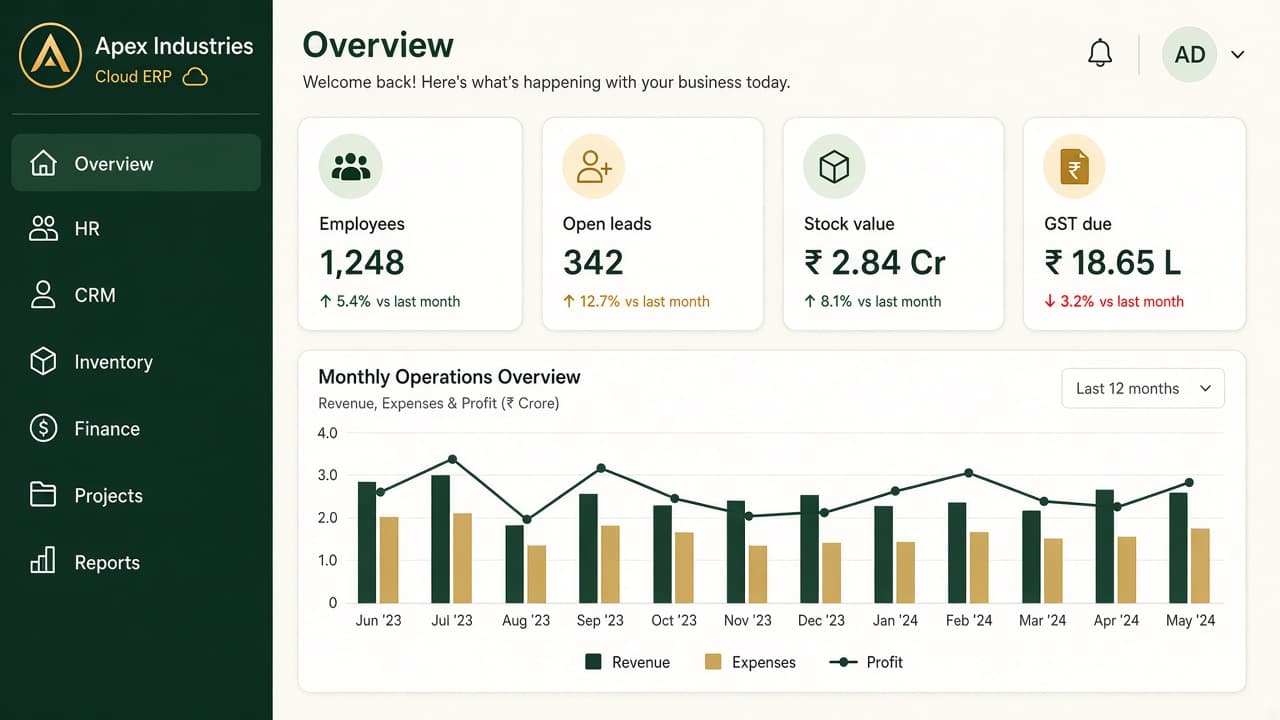
The screen these answers are about
FAQs describe the portal after login — not the office photo in the hero. Sidebar on the left, live numbers on the right.
Menus on a typical organisation include Dashboard, HR, CRM, Projects, Inventory, Finance and Reports. Your role only opens allowed items.
The dashboard shows headcount, open tasks, pipeline and books on one office overview so you are not rebuilding a spreadsheet when someone asks.
Open a module card below, then send an enquiry if that job matches your campus or company.
- School and college ERP
- HRMS and payroll
- CRM and inventory
- Attendance, RFID, cloud login
Browse by ERP feature
HRMS
Employees, leave, departments and roles in one HR file.
Payroll
Salary runs from attendance and salary masters.
CRM
Leads, follow-up and pipeline for sales and admissions.
Inventory
Stock, purchase and vendors without a notebook.
Finance & GST
Books and GST-oriented billing next to stock and payroll.
Attendance & RFID
Class, staff and shift punches — biometric or RFID.
School ERP
Nursery–Class 12: fees, attendance, exams and report cards.
College ERP
Diploma, UG and PG: admissions, batches, faculty and fees.
General — cloud ERP
ERP modules & features
Security & access
Pricing
Setup, mobile & support
Still have questions?
Tell us school, college or business modules. We call back on the numbers you share.