
Yes. ERP Software with Payroll on ZemERP is built for Indian schools, colleges, SMEs and enterprises: cloud login, role-based access, and education plus business modules where they apply.
Home › Products › Payroll Software
ERP Software with Payroll
ERP Software with Payroll — Salary from Attendance in One Portal
Payroll errors come from copying attendance into a spreadsheet. ZemERP ties salary masters to attendance so monthly runs stay consistent for teaching staff and corporate employees.

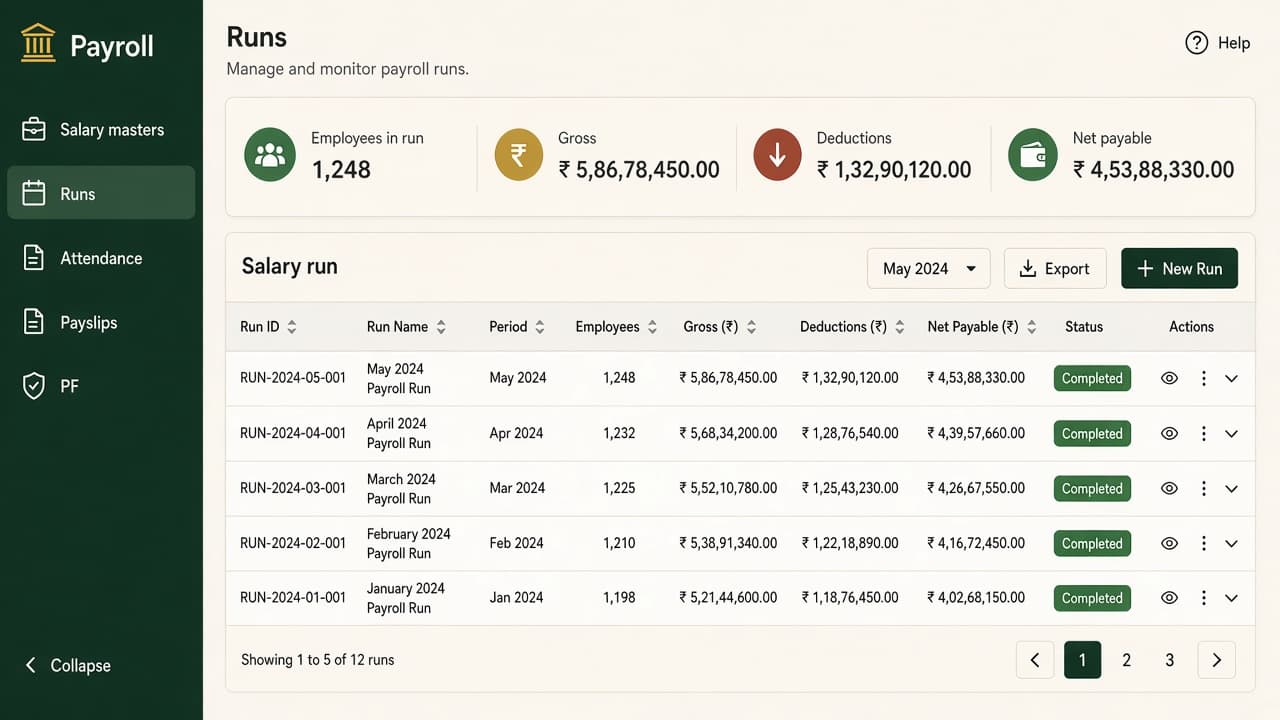
What the Payroll Software screen looks like
Preview of ERP Software with Payroll on ZemERP: left sidebar for daily menus, right side for live numbers. Features of this page are listed beside the screenshot.
The dark green bar on the left is the sidebar. On this Payroll Software screen the menus are Employees, Attendance, Salary masters, Payslips and PF/ESI. Staff only open what their role allows — not one shared password.
The white area on the right is the dashboard. This preview shows this period's payroll, pending punches and salary hold. That is the live view for ERP Software with Payroll instead of rebuilding Excel.
Enquire and we activate an organisation portal. This screenshot is the kind of screen you work in after login.
- Salary masters by employee or staff type
- Period-wise payroll runs
- Attendance-aware calculations
- Clear history for finance and HR
Who this page is for
People who search for ERP Software with Payroll usually sit in one of these roles.
Founders and managers
One dashboard for erp software with payroll instead of five spreadsheets.
HR and admin
Employees, attendance and leave in the same organisation login as the rest of operations.
Finance and stores
Payroll, GST-oriented books, stock and vendors without re-typing numbers.
Sales and delivery
CRM, tasks and inventory on the same cloud ERP your office already uses.
What you get with Payroll Software
Salary masters by employee or staff type
Included in ZemERP Payroll Software — enquire to activate the organisation portal.
Period-wise payroll runs
Included in ZemERP Payroll Software — enquire to activate the organisation portal.
Attendance-aware calculations
Included in ZemERP Payroll Software — enquire to activate the organisation portal.
Clear history for finance and HR
Included in ZemERP Payroll Software — enquire to activate the organisation portal.
Organisation-isolated data
Your company or campus records stay in your portal, not mixed with another tenant.
Grow module by module
Start with HR or inventory, then add CRM, payroll or campus modules.
How onboarding works
1. Pick the fit
Open pricing if you are a school or college, or send an enquiry describing erp software with payroll for your organisation.
2. We activate the portal
After review you get an organisation login. Staff receive role-based menus — not one shared password.
3. Run the daily job
Start with the records you already keep on paper: people, fees, attendance, stock or leads — then expand.
Why campuses and offices switch from Excel
Paper registers and shared drives cannot answer pending fees, absentees or stock in one look. ERP Software with Payroll on ZemERP keeps that record inside one organisation portal.
You enquire, we activate a login, and each role sees only relevant menus. School plans start at ₹2,999/month and college plans at ₹6,999/month. Business modules follow the same cloud ERP.
ERP Software with Payroll — FAQs
Related pages
Ready to use ERP Software with Payroll?
Send an enquiry. Mention school, college or business so we recommend the right portal.
Send enquiry